






How to Tune Your Guitar with This Free Online Tuner
Our tuner uses your device’s microphone to detect the pitch of each string in real time. Here’s how to get started:
Step 1: Select Your Instrument
Choose the instrument you want to tune from the instrument selector. We support guitar, bass, ukulele, banjo, mandolin, violin, viola, cello, and more.
Step 2: Choose a Tuning
Pick a tuning preset from the list. For most players, Standard Tuning (EADGBE) is the default. We offer 100+ presets including drop, open, and alternate tunings.
Step 3: Allow Microphone Access
Click Start Tuning and allow your browser to access the microphone. The tuner needs to hear your instrument to detect the pitch accurately.
Step 4: Play Each String
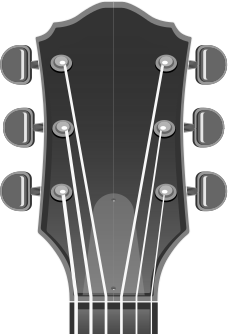
Play one string at a time. The tuner will display the detected note and show whether the string is sharp (too high), flat (too low), or in tune. Adjust the tuning peg until the indicator turns green and the needle is centered.
Step 5: Double-Check
After tuning all strings, play through them again from low to high. Tuning one string can slightly affect the tension on others, especially on acoustic guitars.
Why Tuning Your Guitar Matters
Playing an out-of-tune guitar is one of the most common mistakes beginners make, and even experienced players can overlook it. Here’s why tuning is essential:
- Trains your ear – Regular tuning develops your ability to recognize correct pitches, which improves your overall musicianship over time.
- Makes chords sound right – Even slightly out-of-tune strings cause chords to sound dissonant and unpleasant, regardless of how well you fret them.
- Essential for playing with others – If your guitar is out of tune, you won’t be in tune with the band, backing tracks, or recordings you’re playing along with.
- Protects your instrument – Keeping your guitar at the correct tension prevents unnecessary stress on the neck and bridge.
- Builds good habits – Professional musicians tune before every session. Making it a habit will elevate your playing from day one.
Whether you play guitar, bass, or ukulele, always tune before you practice. You can also use our free online metronome to keep time while you play.
Types of Guitar Tunings
Different tunings open up new sounds, chord voicings, and playing styles. Here are the most popular categories:
Standard Tuning (EADGBE)
The default tuning for guitar, from the lowest (thickest) string to the highest (thinnest): E2, A2, D3, G3, B3, E4. The vast majority of songs are written in standard tuning.
Drop Tunings
Drop tunings lower one or more strings to create heavier, deeper sounds. They’re extremely popular in rock and metal:
- Drop D (DADGBE) – The most common drop tuning. The low E string is tuned down one whole step to D, enabling power chords with a single finger.
- Drop C (CGCFAD) – All strings tuned one whole step below Drop D. Used heavily in metalcore and hard rock.
- Drop B (BF#BEG#C#) – Even lower, used in djent and progressive metal for massive low-end tones.
Open Tunings
In open tunings, the strings form a chord when played open (without fretting). They’re popular in blues, slide guitar, and folk music:
- Open G (DGDGBD) – Used by Keith Richards (Rolling Stones) and many slide guitarists.
- Open D (DADF#AD) – A rich, resonant tuning for fingerpicking and slide.
- Open E (EBEG#BE) – Similar character to Open D but a whole step higher.
- DADGAD – Technically a Dsus4 tuning. Very popular in Celtic, folk, and acoustic fingerstyle.
Half-Step & Whole-Step Down
Eb Standard (Eb Ab Db Gb Bb Eb) is standard tuning lowered by a half step. Used by Jimi Hendrix, Stevie Ray Vaughan, and Guns N’ Roses, it reduces string tension for easier bending and gives a slightly warmer tone.
Tuning Other Instruments
Our tuner isn’t just for guitar. It supports a wide range of stringed instruments:
Bass Guitar
Standard 4-string bass tuning is EADG, one octave below the lowest four guitar strings. We also support 5-string (BEADG) and drop tunings like Drop D.
Ukulele
Standard ukulele tuning is GCEA (re-entrant tuning, where the G string is higher than the C). We support soprano, concert, tenor, and baritone ukulele tunings.
Banjo
Standard 5-string banjo tuning is gDGBD (Open G). We also include tunings for tenor and plectrum banjo.
Mandolin
Standard mandolin tuning is GDAE, the same as a violin but with doubled courses. Tune each pair of strings to the same pitch.
Violin Family (Violin, Viola, Cello)
Violin is tuned GDAE, viola is CGDA, and cello is CGDA (one octave below viola). Our tuner detects the correct octave automatically.
You can also explore our free chord learning game to practice recognizing chord shapes after you’re in tune.
Tuning Tips & Best Practices
1. Always Tune Up to the Note
If a string is sharp, loosen it below the target pitch first, then tune up to the note. Tuning up ensures the string seats properly around the tuning post and stays in tune longer.
2. Tune in a Quiet Environment
Background noise can confuse any microphone-based tuner. Find a quiet spot, mute other strings with your fretting hand, and play one string cleanly.
3. Stretch New Strings
New strings go out of tune frequently as they settle. After putting on new strings, gently stretch each string by pulling it away from the fretboard, then retune. Repeat several times until the strings hold pitch.
4. Check Intonation
If your open strings are in tune but fretted notes sound off, your guitar may need an intonation adjustment. This is done by adjusting the bridge saddle position, a common setup task at any guitar shop.
5. Tune Before Every Session
Temperature, humidity, and simply leaving the guitar on a stand can cause tuning to drift. Make tuning the first thing you do every time you pick up your instrument.
6. Use the Tuner’s Visual Feedback
Watch the needle indicator carefully. Small, slow adjustments to the tuning peg are better than large, fast turns. The green indicator confirms the string is in tune, so take your time and aim for the center.